Certified on Paper, Broken at 240Hz: The DisplayPort 2.1 UHBR20 Cable Fraud Serious Buyers Need to Understand
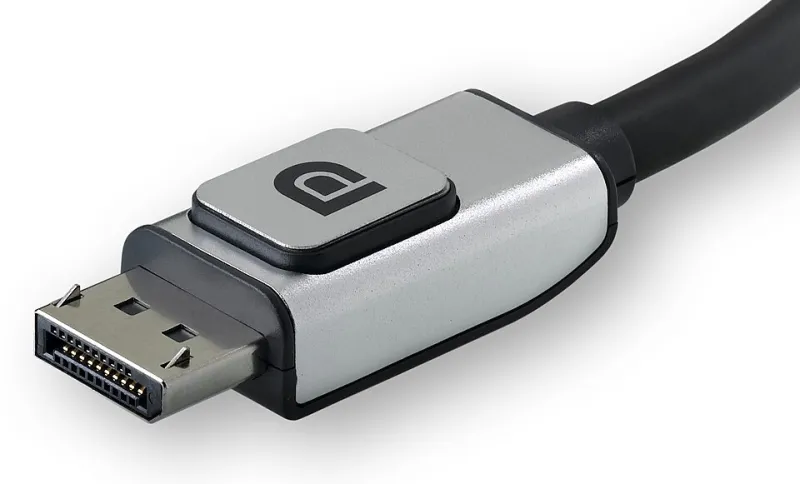
Photo: Belkin, CC BY-SA 3.0, via Wikimedia Commons
When VESA released the DisplayPort 2.1 specification, the organization introduced three distinct bandwidth tiers: UHBR10, UHBR13.5, and UHBR20. That final tier—Ultra-High Bit Rate 20—delivers up to 80 Gbps of raw throughput across four lanes, which is the headroom required to push 4K at 240Hz or 8K at 60Hz without Display Stream Compression. On paper, it is an extraordinary engineering achievement. In practice, it has become one of the most comprehensively misrepresented specifications in consumer electronics retail.
The problem is not the standard itself. It is the near-total absence of meaningful enforcement between what a cable manufacturer prints on its packaging and what the cable's copper actually delivers under real signal conditions.
Why UHBR20 Is Physically Demanding in Ways Previous Standards Were Not
DisplayPort 1.4 operated at HBR3, requiring 32.4 Gbps across four lanes. Cables built to that standard had some margin for manufacturing variance. UHBR20 demands more than twice that bandwidth through the same connector geometry, which means signal attenuation, impedance consistency, and crosstalk between pairs become critical variables rather than acceptable tolerances.
At 20 Gbps per lane, even minor deviations in the cable's dielectric material, conductor gauge, or shielding architecture produce signal degradation that manifests as link training failures, screen flicker, dropped refresh rates, or complete display loss. A cable that passes a basic continuity test and even performs adequately at UHBR10 can fail completely when pushed to UHBR20—and the failure mode is often intermittent, making diagnosis genuinely difficult.
The physical construction required for a legitimate UHBR20 cable includes tight-tolerance twisted pair geometry, high-quality foil and braid shielding, and passive or active signal conditioning in cables longer than approximately one meter. These are not inexpensive design choices, which is why authentic UHBR20 cables from verified manufacturers carry price points that most listing pages quietly ignore.
The Certification Gap Between Label and Reality
VESA operates a formal certification program for DisplayPort cables. Cables that complete the full certification process are permitted to carry the official VESA-certified logo and are listed in a publicly searchable database maintained at vesa.org. This is the single most important verification tool available to buyers, and it is almost entirely unknown outside of professional AV circles.
The gap emerges because VESA certification is voluntary. A manufacturer can print "DisplayPort 2.1 UHBR20" on packaging without submitting a single unit for third-party testing. There is no federal requirement in the United States compelling cable manufacturers to certify DisplayPort products before retail sale, unlike the mandatory UL certification requirements that govern AC power products. The result is a market where the specification language on a listing functions as marketing copy rather than an engineering claim.
A survey of major US e-commerce platforms reveals that the majority of cables listed under "DisplayPort 2.1 UHBR20" do not appear in VESA's certified product database. This includes products sold by third-party sellers on Amazon and Best Buy Marketplace, as well as cables from brands with established reputations in the HDMI category who have not invested in separate DP 2.1 validation infrastructure.
How Counterfeit and Non-Compliant Cables Reach Legitimate Retailers
The supply chain pathway for non-compliant cables is straightforward and difficult to interrupt. A manufacturer in Shenzhen produces a cable with a physical connector that fits a DisplayPort 2.1 port, assigns it a model number containing "2.1" or "UHBR20," and lists it through a wholesale distributor. That distributor supplies the same SKU to a regional US distributor, who fulfills orders from a mid-tier electronics retailer, who lists it with the manufacturer's own spec sheet language. No party in that chain necessarily performed signal integrity testing, and no party bears regulatory liability for the performance claim.
Even retailers with strong quality control programs face structural challenges here. Incoming inspection for cable signal integrity at UHBR20 speeds requires specialized test equipment—specifically, a VESA-compliant cable compliance tester—that most retailers do not own. Without that equipment, visual inspection and packaging review are the only tools available, and neither catches a cable that fails under load.
Common Failure Modes When Budget Cables Are Pushed to Rated Specs
Buyers who connect a non-compliant UHBR20 cable between a certified GPU and a certified monitor typically encounter one of several failure patterns. The most common is automatic link rate negotiation downgrade: the GPU and monitor detect signal errors during link training and quietly step down to UHBR13.5 or UHBR10 to establish a stable connection. The display lights up and appears functional, but the buyer is now operating at reduced bandwidth without any on-screen notification.
A second failure mode involves intermittent signal loss at specific content patterns. Because UHBR20 uses 128b/132b encoding rather than the 8b/10b scheme used in earlier standards, certain data patterns stress the cable's signal integrity differently than others. A cable that appears stable during desktop use may drop frames or lose sync during high-motion video playback or GPU-intensive rendering, which is precisely when the bandwidth headroom is most heavily utilized.
The third and most frustrating failure mode is thermal dependency. Some marginal cables perform adequately at room temperature but develop signal errors as the cable warms during sustained operation. This produces a failure that appears hours after initial setup and disappears after the system is powered down and cooled, leading many buyers to incorrectly conclude they have a driver or firmware problem.
How to Verify Authenticity Before Purchase
The verification process begins at vesa.org. VESA maintains a publicly accessible certified products list that is searchable by manufacturer and product name. Before purchasing any cable marketed as DisplayPort 2.1 UHBR20, confirm the exact model number appears in that database. If it does not, treat the cable's rated specification as unverified regardless of what the packaging states.
Beyond the VESA database, several practical purchase signals indicate higher likelihood of compliance. Active cables—those containing a signal conditioning chip, typically identifiable by a slight thickening near one connector—are significantly more likely to meet UHBR20 specifications at lengths above one meter than passive cables at equivalent price points. Cables from manufacturers who publish third-party test reports, including eye diagram measurements and insertion loss data, demonstrate a level of engineering transparency that commodity cable brands typically do not.
Price is an imperfect but useful filter. A passive UHBR20 cable shorter than one meter from a verified manufacturer currently retails between $25 and $45 in the US market. Active UHBR20 cables at 1.5 to 3 meters from certified manufacturers range from $60 to over $120. Cables priced below these thresholds are almost certainly not built to the full specification, regardless of what the listing claims.
The Buyer's Bottom Line
DisplayPort 2.1 UHBR20 represents a genuine leap in display connectivity capability, and the hardware ecosystem supporting it—from NVIDIA's Ada Lovelace and AMD's RDNA 3 architectures forward—is mature enough to deliver on that promise. The cable market has not kept pace. Until VESA certification becomes a purchase requirement rather than a voluntary differentiator, the burden of verification falls entirely on the buyer.
Check the VESA database. Demand published test data. Pay the price that legitimate engineering commands. The alternative is a $500 display running at two-thirds of its rated capability while you troubleshoot a problem that was never in your GPU.