The $3 Cable Destroying Your $200 Projector Setup: HDMI 2.1 Signal Integrity Explained
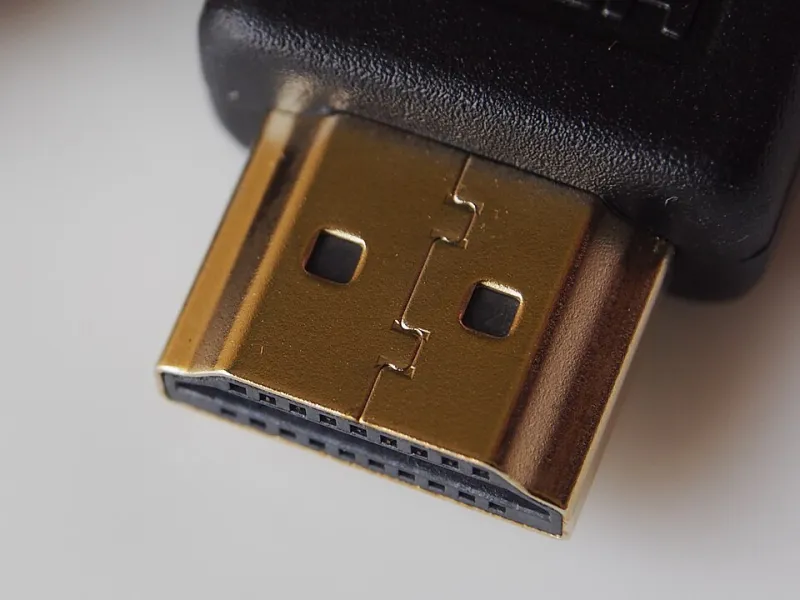
Photo: Pradeep717, CC BY-SA 4.0, via Wikimedia Commons
Spending several hundred dollars on a capable 4K or 8K projector is a meaningful investment. Spending three dollars on the cable connecting it to your source device is an equally meaningful decision—just not in a positive sense. The assumption that any HDMI 2.1 cable will perform identically to any other is one of the most persistent and damaging misconceptions in consumer home theater setup. This article examines the engineering realities behind cable quality variance, explains why certification standards have meaningful blind spots, and provides a practical testing methodology for buyers who want to verify performance before committing to a full installation.
What HDMI 2.1 Actually Demands From a Cable
HDMI 2.1 is not simply a cosmetic revision to its predecessor. The specification supports bandwidth up to 48 Gbps, enabling uncompressed 8K at 60Hz and 4K at 120Hz with HDR. At those data rates, the physical cable is no longer a passive conductor—it becomes an active participant in signal integrity. Every millimeter of conductor length, every solder joint at the connector terminals, and every layer of electromagnetic shielding contributes to whether the full bandwidth reaches its destination intact.
At 48 Gbps, signal attenuation becomes measurable across relatively short distances. A cable that passes a 10 Gbps signal without incident may introduce enough resistance, crosstalk, or impedance mismatch at higher frequencies to cause the receiving device to downgrade the connection or fail the HDCP handshake entirely. This is not a theoretical concern—it is the mechanism behind the intermittent black screens, resolution drops, and "no signal" errors that buyers frequently attribute to faulty projectors or source devices.
Where Cheap Cables Actually Cut Corners
The cost difference between a $3 cable and a $25 cable from a reputable manufacturer does not reflect profit margin alone. Several engineering decisions determine real-world performance at HDMI 2.1 speeds.
Conductor gauge and purity are the first variables. Budget cables frequently use copper-clad aluminum (CCA) conductors rather than oxygen-free copper (OFC). CCA conductors introduce higher resistance and are more susceptible to signal degradation at high frequencies. At HDMI 2.0 speeds, this distinction is often imperceptible. At 48 Gbps, it can be the difference between a stable image and a flickering one.
Shielding construction is the second critical factor. Proper HDMI 2.1 cables use multiple shielding layers—typically a combination of foil and braided shielding around individual wire pairs—to suppress electromagnetic interference. A cable using a single thin foil layer over the entire bundle saves manufacturing cost at the direct expense of crosstalk rejection. In environments with other wireless devices, power cables, or RF sources nearby, this deficiency becomes immediately apparent.
Connector pin alignment and termination quality represent the third failure point. The HDMI connector contains 19 pins in a compact housing. In lower-cost manufacturing environments, tolerances on pin spacing and solder joint quality are looser, resulting in connectors that make intermittent contact under minor physical stress. A cable that tests cleanly on a workbench may fail when routed through a wall or bent around a cabinet corner.
Why Certification Does Not Guarantee Performance
The HDMI Forum operates a licensing and certification program, and cables bearing the Ultra High Speed HDMI certification label have theoretically passed testing at 48 Gbps. However, several realities limit what that certification guarantees at the point of purchase.
First, certification testing is conducted on production samples, not on every unit in a manufacturing run. A factory producing millions of cables annually may submit a carefully assembled sample batch for certification while allowing quality control tolerances to drift on subsequent production runs. The certification label reflects a sample result, not a continuous quality standard.
Second, counterfeit certification labels are a documented problem in the HDMI cable market. Cables sold under fraudulent Ultra High Speed branding on major retail platforms are not hypothetical—consumer advocacy groups and electronics journalists have identified them repeatedly. The HDMI Forum maintains a database of licensed manufacturers, and cross-referencing a cable's brand against that database before purchasing is a worthwhile step that most buyers never take.
A Practical Testing Methodology for Home Theater Buyers
Verifying cable performance does not require specialized laboratory equipment. The following approach is accessible to any buyer with a capable display and source device.
Step one: Force maximum bandwidth mode. On your source device—whether a gaming console, media player, or PC—navigate to the video output settings and explicitly enable 8K or 4K 120Hz output with HDR. Do not allow the system to auto-negotiate a lower bandwidth setting. If the cable cannot sustain the connection at full bandwidth, the display will typically report a signal error or default to a reduced resolution.
Step two: Stress the connection with motion. Static images are the least demanding test for cable integrity. Play high-motion content—action sequences, sports footage, or fast-panning video—at maximum resolution and frame rate. Signal integrity problems that are invisible on static screens frequently manifest as brief flickers, color banding, or frame drops during rapid motion.
Step three: Induce physical stress. With the cable connected and the system running, apply gentle lateral pressure to the cable at the connector junction and at the midpoint of the cable run. A cable with marginal connector termination or a damaged conductor will produce momentary signal interruptions under minor physical load. This test is particularly important for cables that have been shipped rolled tightly in packaging.
Step four: Check for HDCP handshake stability over time. Some cable failures are not immediate—they emerge after the connection has been active for several minutes and the connector has warmed slightly. Allow the system to run for fifteen to twenty minutes before concluding that the cable is performing reliably.
What to Actually Buy
For runs under six feet, a passive Ultra High Speed HDMI cable from a licensed manufacturer—verified against the HDMI Forum's official licensing database—is the appropriate choice. Cables from Belkin, Cable Matters, and Zeskit have been independently tested and verified by multiple consumer electronics publications. For runs exceeding fifteen feet, active HDMI cables or fiber-optic HDMI solutions are worth the additional cost, as passive cables of that length struggle to maintain 48 Gbps without signal boosting.
The cable is not the glamorous component of a home theater system. It is, however, the component most likely to be the source of unexplained performance problems—and the easiest problem to solve once the failure mode is properly understood.